
How to Choose the Right Fiber Patch Cable: OS2 vs OM3, LC vs SC, and the 4 Decisions That Matter
Ordering the wrong fiber patch cable is the networking equivalent of buying a diesel nozzle for a gasoline car — it looks close enough on the shelf, but nothing's going to connect when you get back to the rack. I've watched a junior tech unbox 50 meters of multimode OM3 only to discover the SFP modules at both ends were single-mode LX. The cable itself was fine. The spec was wrong. And that's what this guide is about — knowing which spec to order before you click buy.
Fiber patch cables look nearly identical — yellow or aqua jacket, LC or SC connectors, a few meters long. But the difference between the right cable and the wrong one is the difference between a link that runs at 10 Gbps for a decade and a link that doesn't come up at all. Here's how to choose the right one for your network, broken down by the four decisions that actually matter.
Decision 1: Single-Mode (OS2) vs Multimode (OM3/OM4)
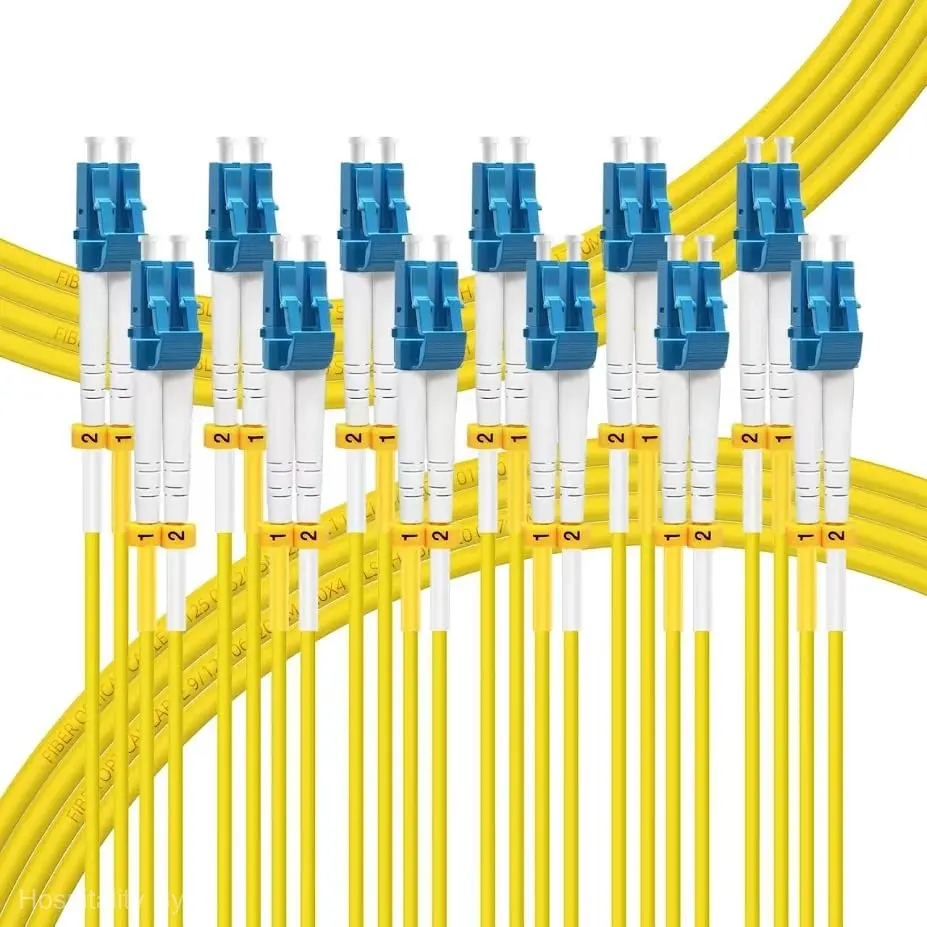
This is the first fork in the road, and it's determined by your transceivers — not your preference. Single-mode fiber (OS2, yellow jacket, 9/125µm core) uses a laser光源 that travels straight down a narrow 9-micron core, reaching kilometers without regeneration. It's the standard for campus links, building-to-building runs, and any connection longer than 300 meters. If the SFP module says "LX," "LR," "ER," or "ZR," you need single-mode.
Multimode fiber (OM3/OM4, aqua or magenta jacket, 50/125µm core) uses a VCSEL光源 that bounces through a wider 50-micron core — cheaper optics but shorter reach. OM3 is rated for 10 Gbps up to 300 meters; OM4 extends that to 550 meters at 10 Gbps and supports 40/100 Gbps up to 150 meters. If your SFP says "SR" or "SR4," you need multimode. The simplest rule: if you're patching within a single rack or between adjacent racks in the same data hall, multimode is usually fine. If the cable leaves the room, single-mode is the safer bet.
The FLYPROFiber OS2 2M-6Pack that anchors this guide is single-mode — yellow jacket, 9/125µm core, LSZH-rated, individually tested. For the majority of commercial network installations where patch panels connect to switches across a server room, this is the cable type you'll reach for most often.
Decision 2: Connector Types — LC, SC, ST, and When Each One Appears
LC (Lucent Connector) is the modern standard — a small, push-pull connector that's dominated new equipment for the last decade. If you're buying SFP transceivers, they take LC. If you're patching into a switch made after 2010, it takes LC. The FLYPROFiber OS2 uses LC duplex connectors with a clip that lets you separate the two fibers into simplex if needed — useful when your equipment uses separate TX and RX ports.

SC (Subscriber Connector) is the older square-profile connector still common on patch panels, fiber distribution frames, and GPON equipment. It's push-pull like LC but about twice the size. You'll see SC on the back of older media converters and on the subscriber side of FTTH installations. If you're connecting an LC switch port to an SC patch panel, you need an LC-to-SC cable — not LC-to-LC.
ST (Straight Tip) is the bayonet-style twist-lock connector that dominated in the 1990s. If you see it, you're working on legacy infrastructure — and you should probably plan a migration rather than buying more ST cables. For new installations, LC is the default. Buy LC-to-LC for switch-to-switch, LC-to-SC for switch-to-panel.
Decision 3: Simplex vs Duplex — One Fiber or Two?
A simplex cable has a single fiber strand with one connector on each end. A duplex cable has two strands (transmit and receive) side by side, usually clipped together. Most modern SFP transceivers use duplex — one fiber sends, the other receives. But BiDi (bidirectional) optics use a single fiber for both directions with different wavelengths, requiring simplex cable. If you're not sure, you almost certainly need duplex. BiDi optics are the exception, not the rule.
The FLYPROFiber 6-pack includes six duplex cables — each with two LC connectors at both ends, individually tested with insertion loss below 0.3 dB per connector. For a 6-pack at 23.99 USD, that works out to about 4 USD per tested duplex cable, which is competitive with bulk pricing from distributors.
Decision 4: Length, Jacket, and Environmental Rating
Measure the actual cable path, not the straight-line distance. A 2-meter cable that needs to route through cable management arms and around a vertical wire manager becomes a 3-meter cable fast. Buy the next length up if you're between sizes — a small service loop is better than a cable pulled taut against the connector.
Jacket material matters for indoor installations. LSZH (Low Smoke Zero Halogen) is the standard for commercial buildings — it doesn't emit toxic fumes if burned, which is why fire codes require it in plenum and riser spaces. PVC jackets are cheaper but release hydrochloric acid when burned. For outdoor runs, look for armored cable with a TPU outer jacket and a stainless steel or aluminum interlocking armor layer — the FLYPROFiber OS2 Armored series is one option, though for most indoor patch applications, standard LSZH is sufficient.
Jacket color follows an informal standard: yellow for single-mode OS2, aqua for OM3, magenta or violet for OM4, lime green for OM5. It's not a spec requirement, but it prevents the aforementioned diesel-in-a-gasoline-car scenario.
Fiber Patch Cable Types at a Glance
| Type | Core | Jacket | Max 10G Distance | Typical Use |
|---|---|---|---|---|
| OS2 Single-Mode | 9/125µm | Yellow | 10+ km | Campus links, long hauls |
| OM3 Multimode | 50/125µm | Aqua | 300m | Data centers, rack-to-rack |
| OM4 Multimode | 50/125µm | Magenta/Violet | 550m | High-density data centers |
| OS2 Armored | 9/125µm | Yellow + metal | 10+ km | Outdoor, direct burial |
For most commercial networking — patch panels, switch uplinks, media converters — OS2 LC duplex is the default answer. The only reason to deviate is if your optics tell you otherwise.
One distinction that trips up newcomers: a patch cord (two connectors, used to connect devices) versus a pigtail (one connector, spliced into a cable run). Cut a patch cord in half, strip the fibers, and you've got two pigtails ready for fusion splicing. It's the same glass — just a different termination strategy.
Quick Checklist Before You Order
- Match the fiber type to your optics. SR = multimode. LR/LX = single-mode. This is non-negotiable.
- Count your connectors. LC at both ends? LC to SC? Are they UPC (blue) or APC (green, angled)?
- Duplex unless you know it's BiDi. Two fibers, clipped together.
- Measure the actual path, add 20%. A cable that barely reaches is a cable that will break under tension.
- LSZH for indoors. PVC if you never want to pass a fire inspection.
- Buy multi-packs for patch panels. The per-cable price drops significantly at 6- and 12-packs.
The FLYPROFiber OS2 6-pack covers the most common use case — switch-to-panel patching in commercial and hospitality networks — with individually tested cables, LSZH jackets, and the standard yellow single-mode color coding that every tech recognizes. Keep a pack in your spares inventory and you'll never be the person driving to a distributor at 4 PM on a Friday because you're one patch cable short.
FLYPROFiber OS2 LC-LC 2M 6-Pack
Single-mode duplex fiber patch cables — individually tested, LSZH, 9/125µm, under 4 USD per cable.
View Product — 23.99 USDThe right fiber patch cable doesn't make your network faster. But the wrong one makes it not work at all. Check your optics, count your connectors, measure your path, buy LSZH — and you'll never be the person holding an aqua OM3 cable in front of an LX single-mode transceiver wondering why the link light won't come on. For outdoor runs, step up to armored OS2 cable. For multimode patching between racks, grab the OM3 6-pack in aqua — same reliability, different optics.